.png)
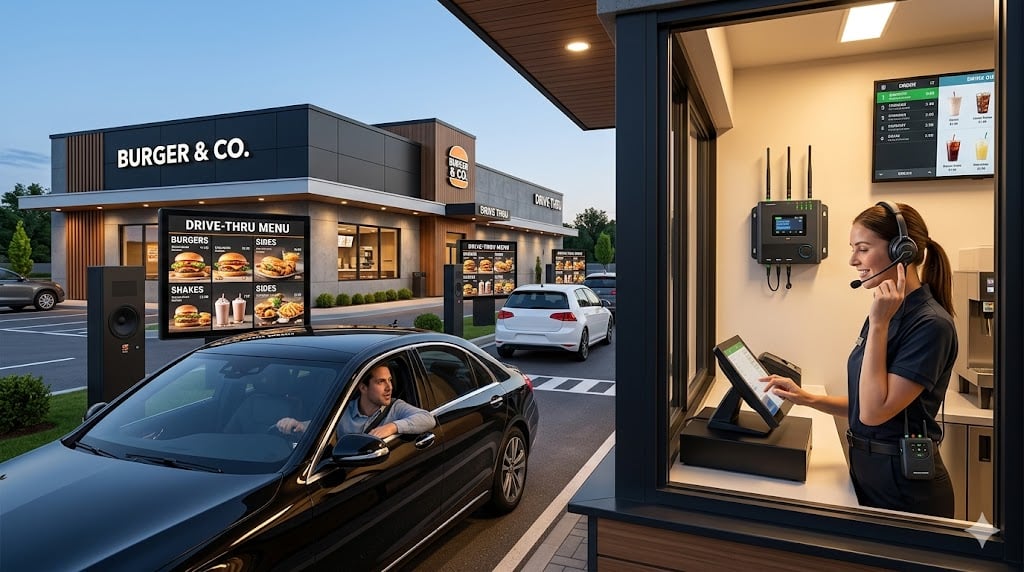
Most customers spend under three minutes in a drive-thru lane and leave with no idea how much technology just processed their order. A single visit moves through nine coordinated stages: vehicle detection, menu display, voice ordering, POS capture, kitchen execution, payment processing, order verification, handoff, and performance logging. Each stage passes live data to the next in real time.
A recent drive-thru study found that the average drive-thru service time across major QSR chains is around 5 minutes and 7 seconds. That number is a product of how well each stage of the drive-thru ordering system performs under pressure.
In this guide we will explain exactly how a drive-thru system works from end to end, covering the hardware, software, and automation that QSR operators use to handle thousands of orders a day. Whether you are evaluating drive-thru technology for a restaurant or just want to understand what happens behind the speaker post, this is the full picture.
How the Drive-Thru System Works: The Full Eight-Stage Process
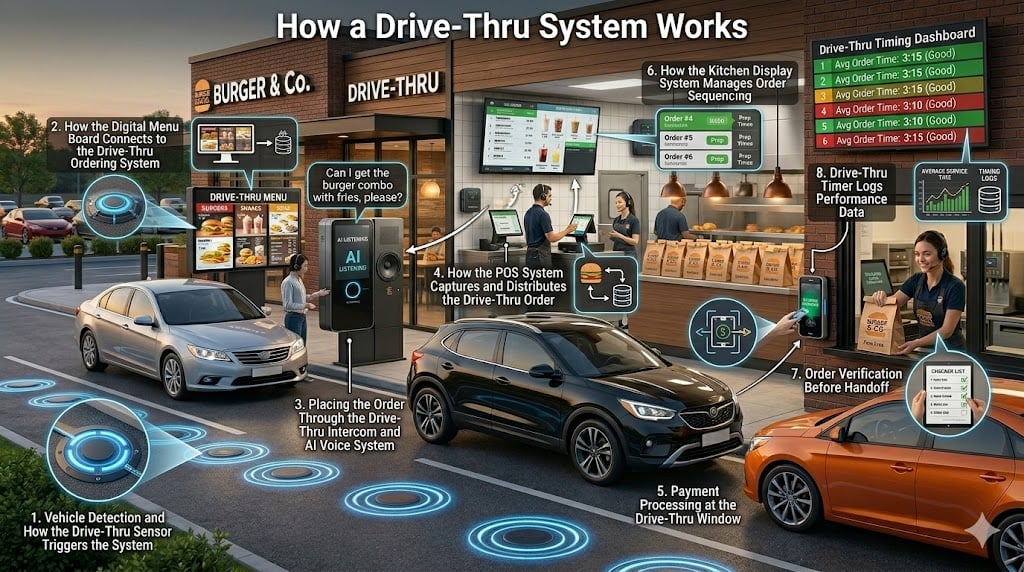
A digital drive-thru system is a connected workflow and not a single piece of technology. Each stage passes data to the next in real time, so vehicle detection triggers the timer, the timer connects to kitchen sequencing, and kitchen sequencing feeds analytics. Remove one link and the whole chain slows down.
Here is how each stage works.
Step 1 - Vehicle Detection and How the Drive-Thru Sensor Triggers the System
The process starts the moment a vehicle enters the lane. Inductive loop sensors embedded beneath the road surface detect the vehicle's metal mass and send an immediate signal to the intercom system and the drive-thru timer. In most modern setups, surveillance cameras using computer vision also activate at this point to track lane position and queue depth.
This matters more than it sounds. In a dual-lane drive-thru system, knowing exactly which lane each vehicle is in, and how far back the queue stretches, lets staff prepare for the next order before the customer reaches the speaker post. McDonald's and Wendy's both use this kind of predictive queuing logic in their higher-volume locations.
Technology Used:
- Inductive Loop Sensors are embedded under the road surface and trigger the intercom and timer automatically when a vehicle passes over them.
- Radar and Infrared Beam Sensors detect vehicle presence without cutting into pavement, reducing installation cost and ongoing maintenance.
- Drive-Thru Timer System begins tracking total service time the moment a sensor is triggered and feeds performance data into analytics dashboards.
- Surveillance Cameras monitor lane position and queue depth in real time, helping staff anticipate order volume and prepare ahead of demand.
Step 2 - How the Digital Menu Board Connects to the Drive-Thru Ordering System
The menu board is not static signage. It is a live screen connected to the POS and back-office systems running the entire restaurant. Price changes and menu updates appear on it automatically through the POS integration, with no manual input required from staff. The board is one screen of the complete drive-thru ordering system covered in this guide.
Dayparting handles the scheduling logic. The system switches between breakfast, lunch, and dinner menus at the right time without anyone touching the board. When an item runs out in the kitchen, the inventory connection removes it from the screen immediately so customers are never shown something the kitchen cannot fulfil.
Limited-time offers, combo promotions, and upsell prompts are pushed directly to the board through the POS or marketing system. These appear at exactly the right moment while the customer is still deciding. Once the order is confirmed at the speaker post, a summary of selected items, any modifications, and the final price appears on the screen for the customer to check before pulling forward.
Industry research shows that digital menu boards with dynamic pricing and suggestive selling prompts can increase average order value by 3 to 5 percent at the lane.
Technology Used:
- High-Brightness LCD or LED Displays maintain full visibility in direct sunlight and update menu content instantly without manual changes.
- Content Management System (CMS) controls time-of-day menus, promotional offers, limited-time items, and sold-out flags automatically across all screens.
- Dynamic Data Integration connects live inventory with menu display, removing unavailable items and adjusting pricing in real time.
- AI-Driven Suggestive Selling displays upsell prompts based on current order patterns, weather conditions, or time of day to increase average order value.
Want to boost your restaurant sales with digital menu boards?
Step 3 — Placing the Order Through the Drive-Thru Intercom and AI Voice System
The speaker post is where a customer's decision becomes a structured order. They speak into the microphone, and either a staff member wearing a noise-cancelling headset or an AI voice ordering system captures the request and enters it into the POS.
When a staff member takes the order, they confirm selections with the customer while simultaneously entering the items into the system. That single action starts the chain. The order reaches the Kitchen Display System within one to two seconds. The drive-thru timer activates at the moment the order enters the POS.
AI voice ordering systems process speech using natural language processing. The system interprets the order, handles modification requests such as removing an ingredient or changing a size, confirms selections with the customer, and sends structured order data directly to the POS without any staff input
Technology Used:
- The microphone and Intercom System capture the customer's voice clearly at the ordering post and transmit audio to staff or the AI ordering system in real time.
- The Headset System lets staff hear and respond to orders from inside the restaurant.
- The AI Voice Ordering System uses natural language processing to interpret spoken orders, handle modifications, confirm selections, and send structured data directly to the POS without human input.
- Noise Cancellation Technology filters background noise to improve accuracy during high-traffic periods.
STEP 4 — How the POS System Captures and Distributes the Drive-Thru Order
The confirmed order moves into the POS system and becomes a live digital record within seconds. From there it goes to three places at once: the Kitchen Display System, the customer-facing confirmation screen at the ordering post, and the analytics dashboard that tracks performance across all locations.
The customer-facing screen gives the customer a chance to review their order and catch any errors before the vehicle moves forward. The drive-thru timer logs the exact moment the order was completed at the speaker.
Cloud-based POS platforms used by major QSR chains feed every order into centralised dashboards. These track item popularity, modification frequency, preparation times, and throughput across hundreds of locations simultaneously, letting operators spot operational issues at specific sites without visiting them.
Technology Used:
- The Point of Sale (POS) System converts the confirmed order into a structured digital record and distributes it instantly to the kitchen, confirmation screen, and timer system.
- Kitchen Display System (KDS) receives the order from the POS and presents it to kitchen staff in real time for immediate preparation
- The Customer-Facing Order Confirmation Screen displays the order to the customer for verification before it moves into the kitchen queue.
- Cloud-Based POS Platform feeds order data into centralised analytics dashboards
Want a smarter, faster, and fully connected drive-thru experience?
STEP 5 —Payment Processing at the Drive-Thru Window
When the vehicle reaches the payment window, the POS already has the full order on screen and the total ready to present. The customer pays through the terminal using a contactless card, NFC mobile payment such as Apple Pay or Google Pay, or chip-and-PIN. Most transactions clear in under five seconds.
The system marks the order as paid and routes it to the pickup window the moment the transaction completes. Some restaurants use the drive-thru camera to capture an image of the vehicle at the payment stage. The handoff team at the pickup window can then match each car to its order visually, which is useful in dual-lane systems where vehicles from two queues converge at a single point.
Geofencing technology takes this further for mobile order customers. When a customer's device enters the restaurant radius, the system detects the signal and triggers advance preparation so the order is ready on arrival, before the vehicle has even joined the lane.
Technology Used:
- Payment Terminal contactless card payments, NFC mobile payments, and chip-and-PIN transactions, typically in under five seconds.
- NFC and RFID Readers enable tap-to-pay for cards and mobile devices
- Geofencing Technology detects when a mobile order customer enters the restaurant radius and triggers early preparation.
- Loyalty Programme Integration applies rewards points, validates discounts, and generates digital receipts automatically at the point of payment.
STEP 6 — How the Kitchen Display System Manages Order Sequencing
After payment, the vehicle moves to the pickup window where the order is already packaged and waiting. The KDS keeps the kitchen team on track with sequenced tickets, individual item timers, and priority flags so nothing gets missed or assembled out of order.
Some kitchens still print a physical label for items such as drinks or desserts as a secondary reference during assembly. When the car pulls up, the POS shows the order as ready and paid. The handoff happens without any back-and-forth because all the information is already on screen.
Order sequencing is where dual-lane drive-thru systems create the most risk. Two queues converge at a single pickup point, so the software must correctly match each prepared order to the vehicle that placed it. A mismatch at this stage is the most common source of drive-thru order errors.
Technology Used:
- Arrival Sensors: detect when a vehicle reaches the pickup window and notify staff immediately.
- Cameras and Timing Monitors track how long each vehicle is stationary at the window and flag delays when dwell time exceeds the target threshold.
- Order Sequencing Software:matches the correct prepared order to the correct vehicle, which is especially important in dual-lane systems.
- Labels, Barcodes, and QR Codes link physical packaging to the digital order record so staff can confirm accuracy before the bag leaves the kitchen.
STEP 7 - Order Verification Before Handoff
Just before the window opens, there is a final check. Barcodes and QR codes on the packaging link the bag back to the original order record, so staff can confirm every item is accounted for at a glance.
Some restaurants use overhead cameras with computer vision at this stage. The system scans the assembled bag automatically and flags any discrepancy before the customer sees the order. Labels attached at the point of ordering travel with the packaging all the way through the kitchen, so there is a reference point at every stage of preparation, not just at the end.
This verification step is what prevents the most common drive-thru complaint: the wrong item or missing item making it out the window. Chick-fil-A consistently ranks highest in drive-thru accuracy in QSR Magazine's annual survey by using multi-point verification processes that combine label scanning with visual confirmation.
Technology Used:
- Barcode and QR Code Scanners verify that every item in the bag matches the original order record before handoff.
- The Order Label System prints item labels at the order capture stage that travel with the packaging through each preparation step.
- Computer Vision Cameras scan the assembled bag and automatically flag discrepancies against the digital order record before delivery.
STEP 8 - Drive-Thru Timer Logs Performance Data
The second the order is handed over and the car pulls away, the drive-thru timer stops. The system records the full service breakdown for that visit: time at the speaker, time in the kitchen, time at the payment window, and total time from lane entry to exit.
That data rolls into the analytics dashboard alongside every other visit from the day. Managers can see where service times are running long and at which specific stage the delay is happening. Staffing decisions, scheduling changes, and kitchen adjustments all come from what those numbers show over time.
The most capable systems use predictive analytics to forecast demand 15 to 30 minutes before it arrives. When the model identifies that a rush is coming based on historical lane volume patterns, it prompts kitchen prep adjustments before throughput drops. This is how high-volume QSR locations maintain consistent service times during peak periods without relying on reactive staffing alone.
Technology Used:
- Exit Sensors detect when a vehicle clears the drive-thru lane and signal the system to record the final timestamp and close the service.
- Drive-Thru Timer System tracks total service time from entry to exit. It stores each completed visit as a performance data point.
- The Analytics Dashboard aggregates service time, order accuracy, payment speed, and kitchen throughput data for management review
- Predictive Analytics Tools use past lane volume patterns to predict demand 15 to 30 minutes ahead. This helps teams staff and prep the kitchen before peak periods.
Conclusion
A drive-thru system is a chain of eight connected stages, each one passing data to the next in real time. Vehicle sensors trigger timers, timers connect to kitchen displays, display feed analytics, and analytics shape the staffing decisions that determine whether the next shift runs smoothly or not.
The technology behind the drive-thru ordering system has become sophisticated enough that most of what happens between your order and your food is invisible. That invisibility is the point. When the system works, it looks effortless. When one stage breaks, service times climb and customers notice immediately.
FAQ
-
What is a digital drive-thru system?
A drive-thru system is an integrated technology stack that connects vehicle detection hardware, digital menu displays, voice ordering, POS software, kitchen display systems, payment terminals, and analytics dashboards. Each component passes real-time data to the next, creating a continuous workflow from the moment a vehicle enters the lane to the moment it exits. The goal is to reduce service time, improve order accuracy, and generate operational data for ongoing improvement.
-
How accurate is AI voice ordering at drive-thrus?
AI voice ordering systems convert spoken requests into structured order data using natural language processing. Accuracy depends on the quality of training data, how well the system handles background noise, and how tightly it integrates with the POS and menu logic.
-
Does AI replace workers at drive-thrus?
AI voice ordering reduces the time staff spend on order taking, but it does not remove drive-thru roles. Employees still manage food preparation, order assembly, customer interaction at windows, verification, and exception handling for complaints, corrections, and special requests. In practice, AI ordering frees staff to focus on speed and accuracy at the kitchen and pickup stages rather than replacing the workforce outright.
-
How does a drive-thru order reach the kitchen?
The moment a customer confirms their order, whether through an AI voice system or a staff member, the POS transmits it to the Kitchen Display System in real time. The KDS queues the order alongside others in sequence, groups preparation tasks by station, and runs individual item timers. There is no printed ticket stage in modern digital systems. The kitchen sees the order within one to two seconds of it being placed.
-
Which fast food chains use AI drive-thru technology?
McDonald's, Wendy's, Taco Bell, and Burger King have all piloted or deployed AI-assisted voice ordering in selected markets. Wendy's partnered with Google Cloud for its FreshAI system. McDonald's tested Automated Order Taking technology before pausing its initial rollout to refine accuracy in noisy conditions. Adoption is uneven across regions and franchise operators, but investment across the QSR sector is accelerating as system accuracy improves.
-
What is the average drive-thru service time?
According to the 2023 Drive-Thru Study, the average service time across major QSR chains is approximately 5 minutes and 7 seconds, which is an increase from earlier years as menu complexity and order customisation have grown. Most operators target total service times under four minutes. Chick-fil-A consistently outperforms this benchmark despite having some of the highest order volumes, largely because of its order accuracy and staffing model.